
CarbitLink-EasyConnection
Wuhan CARBIT Information Co.,LtdTravel & Local
3.0500.00 Reviews
- Version
- 6.4.0
- Installs
- 5.00M
- Age Rating
- Everyone
Screenshots
Our Review of CarbitLink-EasyConnection
 Analysis by Appyee
I see CarbitLink-EasyConnection as a connector for a particular kind of driver: someone whose car can work with phone projection and who wants familiar mobile tools on the built-in display. That can make a routine trip feel less fiddly, but it is not a universal upgrade for every dashboard. My main advice is to check the car’s head unit before installing it and treat compatibility, rather than the app’s promise, as the deciding factor.
Start with the car, not the download
CarbitLink is a free travel and local app from Wuhan CARBIT Information Co.,Ltd. It has an average rating of 3.0 from around 15,000 ratings, with roughly 480 written reviews and more than 5 million installs. Those figures suggest that plenty of people have tried it, but the middling average is a useful reminder that results can depend heavily on the phone-and-car combination. The app is rated for Everyone, and the current version is 6.0.1.
Before relying on it for a commute, I’d check the vehicle manual or the head unit’s own connection options for support. A USB socket alone does not guarantee compatibility: it may only charge a phone or play audio. If possible, test the exact phone and cable you intend to use while parked. This small check is more useful than assuming a feature will work because the car has a touchscreen.
That distinction also helps set realistic expectations. CarbitLink is not a replacement for a car’s built-in system, nor does installing it add projection support to an incompatible head unit. It is best approached as a bridge between supported equipment. If your dashboard cannot recognize the app, repeated reinstalling is unlikely to solve a hardware or system limitation.
The Setup Experience
Alright, let’s talk about getting started with CarbitLink-EasyConnection. I’ll be honest, the setup was surprisingly straightforward. Once you’ve downloaded the app from the Play Store or App Store, you just need to connect your phone to your car's head unit via USB. The app automatically detects the connection and guides you through the process. It’s almost like having a virtual co-pilot!
One thing to note is that you might need a compatible head unit. If your car’s system is on the older side, you may need a few tweaks or additional hardware. But if you’re all set on that front, you’re golden. The app supports a variety of car brands, which is a huge plus.
Making a first connection less frustrating
I’d do the first connection at home or in a parking spot rather than at the curb five minutes before leaving. Start with the phone unlocked, connect the cable, and give the head unit time to respond before tapping through menus. If it does not react, swapping to another cable is a sensible early test; cables can differ in whether they carry data as well as power. This is a practical troubleshooting step, not a guarantee that every connection issue is cable-related.
It is also worth deciding where the phone will sit before setting off. A cable that pulls tight when the phone is moved can interrupt a session, and a phone sliding around the cabin is a distraction even if the display is working. Once the setup succeeds, note which USB port and cable worked. That little bit of consistency can save time the next morning.
Compatibility is not only about the vehicle. Updates to a phone’s operating system or to the car’s head unit can change how a connection behaves, so I would avoid making the first test on the day of an important drive. If the app stops connecting after an update, restart both devices and check the cable and selected input before assuming the app itself is unusable.
Features Galore
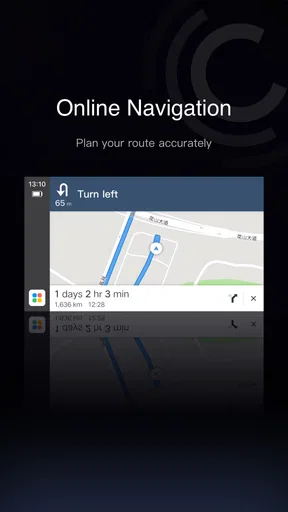
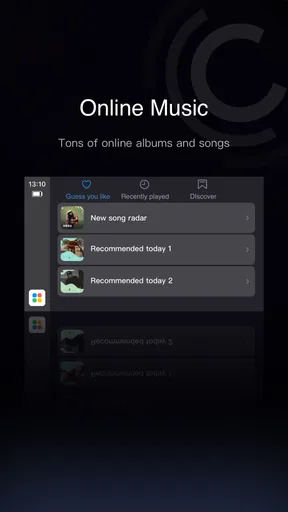
Now, let’s get into the meat of the app—its features. CarbitLink-EasyConnection offers a plethora of functionalities that transform your car’s infotainment system into a smart hub. You can access your favorite apps, including navigation, music, and even messaging, right on your car’s display. This is a game-changer for those who hate fiddling with their phones while driving.
One of my favorite features is the screen mirroring capability. It allows you to mirror your phone’s screen on the car’s display. Whether you’re navigating with Google Maps or playing tunes from Spotify, everything is right there, larger than life, and super accessible.
Plus, the app supports voice commands. Just a simple "Hey Siri" or "Okay Google" and boom, you’re in control without taking your hands off the wheel. Safety first, folks!
How I’d use the display on an ordinary drive
Imagine leaving work for an unfamiliar appointment across town. I would set the destination and choose the audio before moving, then keep the phone tucked away while following the route on the car screen. If someone sends a message, voice control may help me respond or manage playback without reaching down, but I would still wait until safely stopped for anything that needs attention. A larger display can reduce the temptation to glance at a phone; it does not make every on-screen task safe while driving.
Mirroring can be useful when the navigation app I already know is easier for me than learning a separate interface. The trade-off is that the car display is showing the phone’s presentation, so a screen designed for handheld use may not feel as tidy or readable from the driver’s seat. I would set up a route while parked and avoid browsing menus once the car is moving.
For a passenger, mirroring can be handy when choosing music or checking a route during a stop. For the driver, the value is narrower: glanceable directions and simple controls, not an invitation to use the dashboard as a second phone. That distinction matters if you share the car with family members who may expect the system to behave exactly like a native, car-specific interface.
The Good, The Bad, and The Zoomy
So, what’s the verdict? Well, in terms of functionality, CarbitLink-EasyConnection does a stellar job. The user interface is intuitive, and the app runs smoothly without any noticeable lag. The integration is seamless, and the convenience factor is off the charts.
However, as with any tech, there are a few quirks. Some users have reported occasional connectivity drops, which can be annoying when you’re in the middle of navigating. Also, while the app supports a wide range of cars, there are still some systems it doesn’t play nice with. It’s always a good idea to check compatibility before diving in.
And let’s not forget the data usage. Since the app relies on your smartphone for internet connectivity, keep an eye on your data plan, especially if you’re a frequent road-tripper.
Where it sits among driving options
Compared with a car’s native navigation or media system, phone projection can put familiar apps and habits within reach, but it depends on the connection and the phone. A built-in system may be more dependable for basic functions that work without a phone attached. Compared with simply placing a phone in a mount, CarbitLink offers the appeal of using the vehicle’s larger display, while a mount is usually less dependent on a compatible head unit and can be simpler when all you need is navigation.
Wireless projection, where a vehicle supports it, avoids the cable routine; this app’s described setup uses USB, so convenience comes with a physical connection. That cable can keep the phone in place and connected during a drive, but it also means another point of failure and a need to manage charging and placement. I would choose the least complicated option that works reliably in my own car, rather than treating projection as automatically better.
There is also a practical difference between navigation, media, and messaging. Navigation and audio are the strongest everyday reasons to connect; messaging is better treated as a secondary convenience, especially because reading or typing while driving is unsafe. Voice commands are useful when they work with the phone and the car, but they should not be the only plan for an important route or call.
Who should give it a try—and who should pass
I’d consider it if my car’s head unit is compatible, I regularly use phone-based navigation or music, and I’m comfortable connecting by cable. It makes the most sense for drivers who want continuity with apps they already know, rather than people hoping to add new capabilities to an unsupported dashboard. It may also suit a household that shares one compatible car and wants the same familiar phone interface on different trips.
I’d skip it if the vehicle’s system is incompatible, if a stable built-in navigation setup already meets your needs, or if connecting a phone every trip sounds like one more chore. It is also a poor fit for anyone expecting the app alone to solve unreliable mobile coverage: using phone-based services still depends on the phone and the network available along the route. For remote drives, I’d prepare maps and essential information ahead of time rather than assume a live connection will always be there.
The app is free to install, with in-app purchases listed from $0.99 to $29.99 per item. I would not treat that range as a reason to buy anything before testing the basic connection and deciding whether the app works well with my specific car. A useful evaluation is simple: connect while parked, try a familiar navigation route, play audio, and see whether the display remains stable over a normal trip.
Final Thoughts
In conclusion, CarbitLink-EasyConnection is a solid choice for anyone looking to enhance their driving experience with smart technology. It does what it promises and does it well, with just a few minor bumps along the road. The convenience of having your smartphone’s capabilities right there on your car’s display is a modern-day marvel.
If you’re someone who loves staying connected and making the most out of every drive, this app is definitely worth a try. Just make sure your car’s system is compatible, and you’re set to enjoy a smoother, smarter ride. So go ahead, download it, and hit the road with confidence!
Happy driving, and may your journeys be as smooth as this app’s interface!
My own recommendation is a cautious yes, not a blanket endorsement. When the car recognizes the phone and the tools you need appear reliably, the larger screen can make routine navigation and audio easier to manage. When compatibility is uncertain or the connection keeps dropping, a dependable built-in system or a securely mounted phone is the better choice. Test it on an ordinary trip before relying on it for a time-sensitive journey.
Verdict
Strengths of CarbitLink-EasyConnection
- User-friendly interface for easy navigation.
- Supports a wide range of car models.
- Stable connection with minimal lag.
- Regular updates improve functionality.
- Compatible with both Android and iOS.
Limitations of CarbitLink-EasyConnection
- Limited app compatibility beyond basics.
- Initial setup can be slightly confusing.
- Requires internet for full features.
- May consume significant battery power.
- Occasional disconnection issues reported.
Similar Picks in This Category
View All
Google Maps
Google LLC3.4

Google Maps Go
Google LLC4.1

Booking.com: Hotels & Travel
Booking.com Hotels & Vacation Rentals4.8

Google Earth
Google LLC3.8

Skyscanner Flights Hotels Cars
Skyscanner Ltd4.8

trivago: Compare hotel prices
trivago N.V.4.4
Frequently Asked Questions
What is CarbitLink-EasyConnection and how does it work?
CarbitLink-EasyConnection is an app designed to mirror your smartphone's screen onto your car’s infotainment system. By connecting your phone via USB or Wi-Fi, you can access apps, music, navigation, and more directly from your car's display. It's a convenient way to enhance your driving experience with familiar smartphone functionalities.
Is CarbitLink-EasyConnection compatible with all smartphones and vehicles?
CarbitLink-EasyConnection supports a wide range of Android devices, but compatibility can vary based on specific smartphone models and car infotainment systems. It’s recommended to check compatibility with your device and vehicle before downloading. iOS support may be limited, so iPhone users should verify compatibility details on the app’s official site.
How secure is CarbitLink-EasyConnection?
CarbitLink-EasyConnection prioritizes user security by ensuring that data transmission between your smartphone and car is encrypted. However, it's vital to download the app from official sources like Google Play Store to avoid security risks. Always keep the app updated to benefit from the latest security enhancements and features.
Does CarbitLink-EasyConnection require a subscription or in-app purchases?
The app itself is free to download, but certain features may require in-app purchases for full functionality. Users should review the app’s purchase options to understand which features are included in the free version and which ones require payment. This helps in making an informed decision before using the app extensively.
What are the common issues users face with CarbitLink-EasyConnection and how can they be resolved?
Common issues may include connectivity problems, such as difficulty in establishing a stable link between the phone and car. This can often be resolved by ensuring both devices have the latest software updates, using a high-quality USB cable, or adjusting connection settings. If problems persist, consulting the app’s help section or customer support is advisable.
